
Every “best AI writing tools” list reads the same: six logos, six checkmarks, six paragraphs of marketing copy with the serial numbers filed off. That’s not useful when you’re trying to figure out why your Jasper bill jumped from $59 to $69, why Copy.ai suddenly wants $1,000/month for the plan you used to pay $49 for, or why Writesonic’s dashboard now talks about “AI search visibility” instead of blog posts. We went through the pricing pages, the setup flows, and the user complaints on each platform to find where these tools actually diverge — not where their landing pages say they do.
How We Tested
We evaluated Jasper, Copy.ai, Writesonic, Rytr, Sudowrite, and Grammarly (Go) between July 18–25, 2026, using the current published pricing pages, official documentation, and a cross-section of verified user reviews on G2 and Capterra for each platform. Each tool was scored on four criteria: transparency of pricing (does the advertised price match what you’ll actually pay at your usage level), time-to-first-usable-output, fit for a specific type of writer rather than “everyone,” and the gap between marketed features and what users report actually shipping. Where a tool’s own interface wasn’t directly testable end-to-end, we cross-checked claims against at least two independent review sources before including them.
Quick Comparison: 6 AI Writing Tools at a Glance
Tool |
Starting Price |
Setup Complexity |
G2 / Capterra Rating (as of July 25, 2026) |
Standout Limitation |
|---|---|---|---|---|
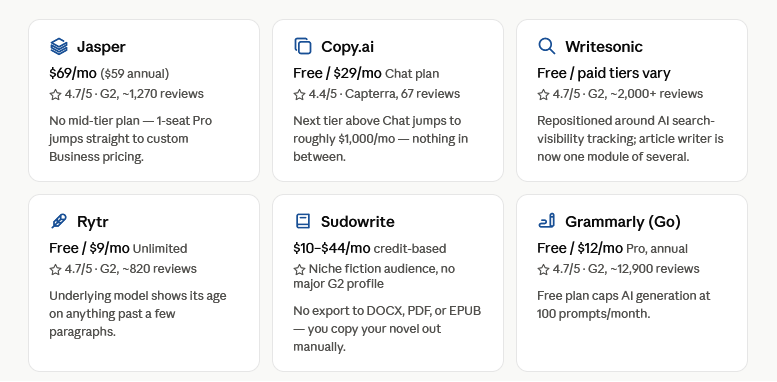
Jasper |
$69/mo ($59/mo annual), no free plan |
Low for solo use, but no simple multi-seat step |
4.7/5 (G2, ~1,270 reviews) |
Jumps straight from 1-seat Pro to custom-quoted Business — no plan in between |
Copy.ai |
Free tier (2,000 words/mo); Chat $29/mo |
Fast for Chat tier, steep past it |
4.4/5 (Capterra, 67 reviews) |
Next paid tier above Chat jumps to roughly $1,000/mo — nothing in between |
Writesonic |
Free tier; paid plans vary by product line |
Moderate — product has restructured around a new dashboard |
4.7/5 (G2, ~2,000+ reviews) |
Has repositioned around AI search-visibility (GEO) tracking; core article writer is now one module among several |
Rytr |
Free (10,000 characters/mo); Unlimited $9/mo |
Very low, template-driven |
4.7/5 (G2, ~820 reviews) |
Underlying model shows its age on anything past a few paragraphs |
Sudowrite |
$10–$44/mo (annual), credit-based |
Low to start, confusing credit math later |
No major G2 presence; niche fiction-writer audience |
No export to DOCX, PDF, or EPUB — you’re copy-pasting your novel out |
Grammarly (Go) |
Free; Pro $12/mo (annual) |
Lowest — browser extension install |
4.7/5 (G2, ~12,900 reviews) |
Free plan caps AI generation at 100 prompts/month — burns fast if you use it for drafting, not just editing |
1. Jasper: Best for Marketing Teams That Need One Brand Voice Everywhere
Jasper’s pitch has shifted from “AI writing tool” to “on-brand content hub,” and the pricing reflects that ambition. The Pro plan starts at $69/month billed monthly, dropping to about $59/month if you commit annually — for one seat. What the pricing page doesn’t advertise clearly: there’s no middle tier. Add a second writer and you’re not choosing from a menu, you’re requesting a custom Business quote, which procurement data puts anywhere from a few hundred to several thousand dollars a month depending on team size.
The friction point we’d flag for anyone comparison-shopping: Jasper no longer offers a permanent free plan, only a 7-day trial. If you’re the kind of buyer who likes to sit with a tool for a few weeks before committing, that window is tight — you’ll need to make a call on Brand Voice quality and template fit inside a week.
Best for: An in-house marketing team of 3+ people producing daily, on-brand content across channels, where the cost of a Business contract is easily justified by hours saved.
-
Pros:
Brand Voice training genuinely reduces editing time on repeat content; Surfer SEO integration removes a step for SEO-focused teams; deep template library covers most marketing formats.
-
Cons:
Solo creators and freelancers are paying enterprise-tool pricing for single-seat access; output still needs fact-checking on technical topics; no native CMS publishing, so you’re exporting content manually.
Suggested image alt-text: “Jasper AI dashboard showing brand voice and content template selection”
2. Copy.ai: Best for Solo Marketers Who Only Need the Chat Tier
Copy.ai has restructured its pricing three times in under two years, and the current structure has a gap that matters if you’re budgeting: the Free plan gives you 2,000 words a month, the Chat plan is $29/month ($24/month annual), and then the next real tier jumps to roughly $1,000/month for workflow automation and higher seat counts. There’s effectively nothing between “solo chat interface” and “GTM automation platform built for sales and marketing teams.”
If your actual use case is “I want a ChatGPT-style writing assistant with content templates,” the $29/month Chat plan does that job fine. Where people get burned is assuming the next tier up will be a modest step — it isn’t.
Best for: A solo marketer or freelancer who wants unlimited-feeling chat-based writing without workflow automation, and who has already priced out the $1,000/month jump and knows they won’t need it.
-
Pros:
Real permanent free tier (2,000 words/mo, 90+ templates) with no credit card required; Chat plan is genuinely useful for fast first drafts; unlimited generation once you’re past Free.
-
Cons:
Brand Voice and Infobase features are locked out of Free entirely; the pricing cliff above Chat makes Copy.ai a poor fit for a team expecting to scale gradually; third-party sites still list outdated $36–$49 tiers that no longer exist on the live page, so double-check before you budget.
Suggested image alt-text: “Copy.ai pricing tiers showing the gap between Chat and Growth plans”
3. Writesonic: Best for Teams That Want Content Creation and AI-Search Tracking in One Tool
The most useful thing to know about Writesonic in 2026 isn’t a pricing number — it’s that the product itself has changed shape. Writesonic now leads with “AI Search Visibility” (GEO) tracking: monitoring where your brand shows up in ChatGPT, Gemini, and Google AI Overviews, then recommending content fixes. The article writer that used to be the whole product is now one module inside a larger dashboard.
That’s not necessarily a downgrade, but it does mean the plan you land on determines how much of that dashboard you can actually touch. Entry tiers cap you to tracking a single AI platform for one brand, which most solo users outgrow within a few months of actually using the visibility data.
Best for: A content marketer or small agency that wants both blog/article generation and visibility tracking across AI search engines in one subscription, rather than stitching together separate tools.
-
Pros:
Strong G2 and Capterra ratings backed by a large review base; access to multiple underlying models (GPT-4, Claude, Gemini) rather than being locked to one; GEO tracking is a genuinely new capability most competitors don’t offer yet.
-
Cons:
If you only want a straightforward article writer, you’re paying for a visibility dashboard you may never open; billing structure has shifted enough in the past year that older reviews and pricing guides are unreliable; users report inconsistent output quality on technical subject matter.
Suggested image alt-text: “Writesonic AI search visibility dashboard showing brand mentions across AI platforms”
4. Rytr: Best for Short-Form Copy on a Tight Budget
Rytr is the cheapest tool on this list by a wide margin — Unlimited runs $9/month ($7.50 billed annually) — and it doesn’t pretend to be anything more than a fast, templated assistant for short-form copy: product descriptions, ad copy, email subject lines, social captions. Over 40 templates cover most of what a solo blogger or small business actually writes day to day.
The trade-off shows up the moment you ask it to do more than a paragraph or two. Multiple independent reviews describe the same pattern: ask Rytr to expand a section and the output can turn repetitive or lose coherence, a symptom consistent with running on an older-generation language model rather than the current frontier models competitors use.
Best for: A beginner blogger, freelancer, or small business owner who needs quick short-form copy and doesn’t need Rytr to carry a 1,500-word article on its own.
-
Pros:
Genuinely the lowest price-to-output ratio in this category; free plan is a real evaluation tool, not a crippled trial; near-zero learning curve.
-
Cons:
Long-form output quality drops off noticeably past a few paragraphs; no PDF export or WordPress publishing integration, which users have been requesting for years without it shipping; factual accuracy needs the same scrutiny as any AI tool, arguably more given the model generation in use.
Suggested image alt-text: “Rytr template selection screen showing short-form content use cases”
5. Sudowrite: Best for Fiction Writers Who Want a Collaborator, Not an Autopilot
Sudowrite is the one tool here that isn’t trying to serve marketers at all — it’s built specifically for novelists, short-story writers, and screenwriters, and it shows in the toolset: Story Bible for tracking characters and world details, Describe for sensory prose, Canvas for plotting. Pricing runs on a credit system rather than flat unlimited access, from around $10/month at the Hobby tier up to $44–$59/month at Max, and the credit math is genuinely confusing until you’ve burned through a monthly allowance once and learned which model settings eat credits fastest.
The gap that surprised us: there’s no export to DOCX, PDF, or EPUB, and no formatting or publishing pipeline at all. If your workflow ends with a manuscript ready to send to an editor or upload to KDP, you’re copying text out manually into a separate tool to finish the job.
Best for: A fiction writer who wants help pushing through scenes and maintaining character voice across a long manuscript, and who already has a separate formatting/export workflow in place.
-
Pros:
Story Bible genuinely maintains character and plot continuity better than general-purpose AI prompting; Describe and Expand tools produce noticeably more literary prose than marketing-focused competitors; free trial credits let you test real chapter-length output before paying.
-
Cons:
No export formats of any kind — a serious gap for a tool aimed at people trying to finish a book; credit consumption varies by which model you pick, making costs hard to predict; not built for non-fiction, memoir-adjacent business books, or technical writing at all.
Suggested image alt-text: “Sudowrite Story Bible interface showing character and plot tracking for a novel”
6. Grammarly (Go): Best for Fixing and Polishing Writing You’ve Already Drafted
Grammarly’s generative features — branded Grammarly Go, recently folded into a broader “Superhuman” suite alongside an email client and doc editor — are built around a different job than the other five tools on this list. It’s not trying to draft your blog post from a prompt; it’s sitting inside your browser, Google Docs, Word, or Gmail, catching grammar issues and offering full-sentence rewrites as you write elsewhere.
The free plan is genuinely generous for basic grammar and spelling, but it caps generative AI use at 100 prompts a month. If your workflow leans on Grammarly to actually generate paragraphs rather than just correct them, that ceiling arrives faster than you’d expect — often within the first couple of weeks of regular use.
Best for: Someone who already writes their own first drafts and wants an always-on editor for tone, clarity, and grammar — students, professionals polishing emails, non-native English writers — rather than someone who wants AI to generate content from scratch.
-
Pros:
Works natively inside the apps you already use instead of requiring a separate tab; free tier is one of the most usable in this entire category; Pro at $12/month (annual) undercuts every other paid tool here.
-
Cons:
Free plan’s 100 AI-prompt cap is easy to burn through if you use it for generation rather than editing; the newer Superhuman Business bundle at $33/month adds an email client and doc editor most buyers don’t need just to get team features; consumer review sites like Trustpilot show a noticeably more mixed sentiment than the software-buyer platforms (G2, Capterra), largely around billing and cancellation experiences.
Suggested image alt-text: “Grammarly Go rewrite suggestion appearing inline in a Google Docs document”
FAQ
Is Jasper worth it if I’m a solo blogger, not a marketing team?
Probably not at full price. Jasper’s Brand Voice and campaign workflow features are built for teams managing multiple content types under one identity. A solo blogger is paying for infrastructure they won’t use — Rytr or Copy.ai’s free/Chat tier will cover the same ground for a fraction of the cost.
Why did Copy.ai’s pricing change so much?
Copy.ai has repositioned from an individual-marketer tool toward enterprise go-to-market automation — sales sequences, multi-step workflows, CRM integration. The Chat plan is what’s left of the old individual product; everything above it is priced for the new audience, which is why the jump feels so abrupt.
Can Sudowrite actually write a full novel by itself?
Technically the Story Engine can generate a full draft from an outline, but every review we checked, including our own read of the tool, agrees the output needs substantial guidance and rewriting to feel authored rather than generated. Treat it as a drafting partner, not an autopilot.
Do any of these tools have real mobile apps with App Store ratings?
Grammarly has a genuine standalone mobile keyboard app; the other five are primarily browser/web-based tools without a comparable native app experience, which is why we used G2 and Capterra ratings above instead of App Store scores — they’re the more meaningful signal for how these products are actually used.
The Bottom Line
If you had to pick just one: for most people writing marketing or business content regularly, Writesonic is the strongest all-around pick right now, mainly because it’s the only tool here actively expanding into where content strategy is actually heading — visibility inside AI search results, not just search engines. If you’re a fiction writer, skip straight to Sudowrite and budget for a separate export workflow. If you just need your existing writing sharpened rather than generated, Grammarly’s $12/month Pro plan is the easiest recommendation on this list, full stop.