
Radical - Technology & Business Blog | Lifestyle & Home Decor
No Result
View All Result
  • Home
  • Technology
  • AI
  • Apps & Software
  • BUSINESS
    • Cryptocurrency
    • Finance
    • Insurance
    • Law
    • Automobile
    • Real Estate
  • Internet & Digital
  • Reviews
  • About
  • Home
  • Technology
  • AI
  • Apps & Software
  • BUSINESS
    • Cryptocurrency
    • Finance
    • Insurance
    • Law
    • Automobile
    • Real Estate
  • Internet & Digital
  • Reviews
  • About
Radical - Technology & Business Blog | Lifestyle & Home Decor
No Result
View All Result
Home Internet & Digital

How to Download YouTube Video Part In 3 Simple Steps

johnson by johnson
January 11, 2023
in Internet & Digital
2 min read
0
Download YouTube Video Part

Some YouTube videos are sluggish and filled with filler. Some videos are only compelling during certain times. If so, you might want to download a portion rather than the entire YouTube video.

You’ll free up storage space and shorten the video by doing this. This is due to the lesser size of a shorter YouTube video. You’ll discover how to grab a portion of a YouTube video in this tutorial in 3 simple steps.

How to Download YouTube Video Part

Table of Contents

Toggle
  • How to Download YouTube Video Part
    • Copy the Link to the YouTube Video
    • Use Kapwing
    • Export the Video

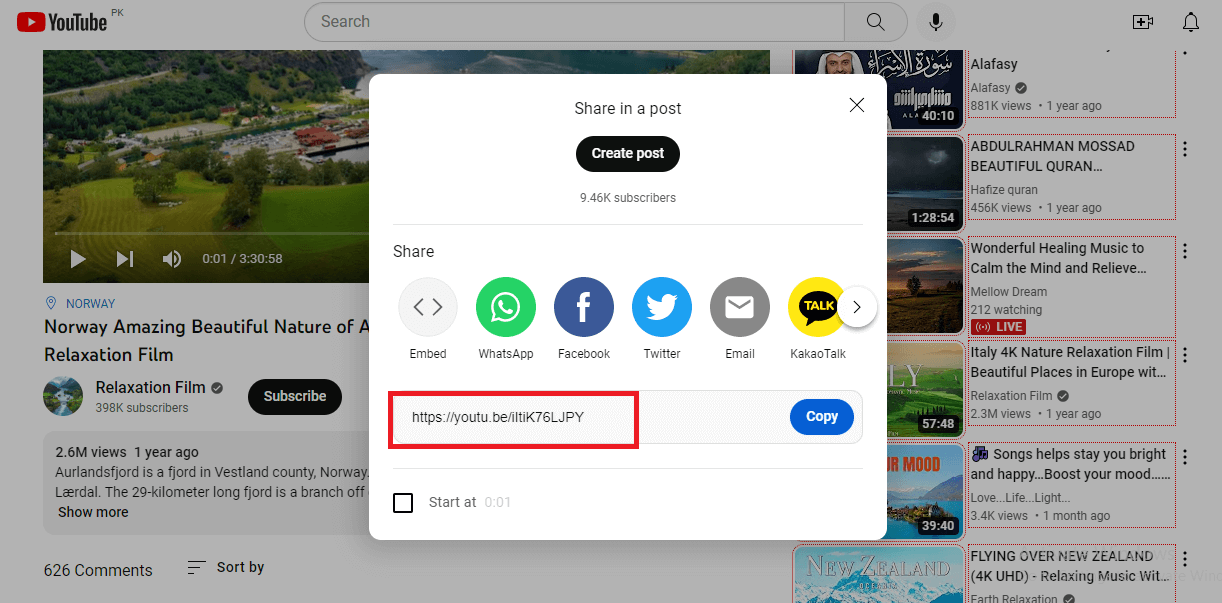
You must first copy the video’s YouTube link in order to download a portion of the video. Copy the link to the video and then put it into a free online editor like Kapwing. The video can then be cropped by clicking and dragging its left and right boundaries. Finally, save the video as an MP4 file, share it, and download it.

Copy the Link to the YouTube Video
Download YouTube Video Part

  • Go to the YouTube video you wish to download a section of by using the search bar.
  • Select the “Share” button.
  • Take note of the YouTube video URL.

Use Kapwing

  • Go to the official site of kapwing, www.kapwing.com/tools/trim
  • Create a Kapwing account or sign in.
  • In the “Place an image or video URL” area, paste the YouTube video link

Export the Video

  • To trim the video, click and drag its left and right boundaries.
  • The “Export Project” button should be clicked.
  • Decide on “MP4”, a resolution, and a compression ratio.
  • Select “Export as MP4” from the menu.
  • To download the video, click the “Download file” button.
Tags: Download YouTube Video Part
ShareTweetPinSendShare
Previous Post

Best 10 Rainierland Alternatives To Watch Movies Free Online In 2023

Next Post

A Woman Was Born In 1975 And Died In 1975 Riddle

johnson

johnson

Johnson covers technology, AI, and digital security topics for Radical, including app guides, privacy and cybersecurity tips, and business software comparisons. Writing focuses on breaking down technical topics into clear, actionable guidance for everyday readers.

Related Posts

Best Accounting SaaS Tools
Internet & Digital

Best Accounting SaaS Tools for Small Firms in 2026 (Expert Analysis & Comparisons)

July 25, 2026
Best Employee Roster Apps
Internet & Digital

Top 10 Best Employee Roster Apps (Updated for 2026)

July 25, 2026
Best Home Improvement Loans
Internet & Digital

Best Home Improvement Loans in 2026 — Expert Reviewed & Compared

July 25, 2026
Best VPNs for Snapchat
Internet & Digital

Best VPNs for Snapchat — Updated Guide & What’s Changed

July 25, 2026
Free Local AI Background Remover for Windows and Mac: Creative Fabrica Studio Desktop Review
Internet & Digital

Free Local AI Background Remover for Windows and Mac: Creative Fabrica Studio Desktop Review

July 18, 2026
how to Spot Phishing Email
Internet & Digital

7 Methods to Spot a Phishing Email

July 18, 2026
Next Post
A Woman Was Born In 1975 And Died In 1975

A Woman Was Born In 1975 And Died In 1975 Riddle

  • About Us
  • Contact Us
  • Editorial Guidelines
  • Meet Our Team
  • Privacy Policy

Radical © Copyright 2021, All Rights Reserved

No Result
View All Result
  • Home
  • Technology
  • AI
  • Apps & Software
  • BUSINESS
    • Cryptocurrency
    • Finance
    • Insurance
    • Law
    • Automobile
    • Real Estate
  • Internet & Digital
  • Reviews
  • About

Radical © Copyright 2021, All Rights Reserved