Anyone who edits product photos for a living knows the routine. Snap the photo, crop it, remove the background, resize it, export it, repeat fifty more times before lunch. And almost every tool that promises to speed that up wants something in return: an upload queue, a monthly credit cap, or a subscription you forget to cancel.
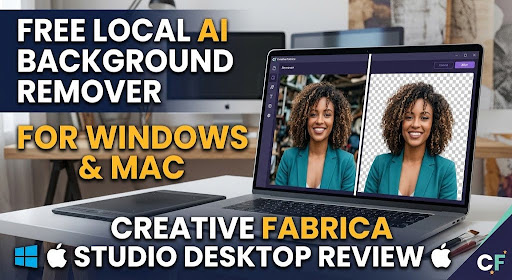
Creative Fabrica Studio Desktop takes a different approach. It’s a free Windows and Mac application that runs AI-powered background removal, image upscaling, image generation, and text-to-speech directly on your own computer, no cloud upload required for the core editing tools. I spent an afternoon putting it through an actual content-creation workflow to see whether “free and local” holds up in practice.
Why Cloud-Only Editing Tools Start to Feel Like a Tax
Most background removers and upscalers you’ll find online run entirely through a browser tab connected to someone else’s server. In day-to-day use, that tends to mean:
- Uploading images one at a time and waiting on a progress bar
- Running out of free credits halfway through a batch
- Slower results the moment your Wi-Fi has a bad day
- Your unreleased product photos or designs sitting on a third-party server
If you’re a solo creator handling dozens of images a week for a shop, a YouTube channel, or client work those small frictions pile up into real lost time. That’s the exact gap Creative Fabrica built this desktop app to close.
So What Exactly Is Creative Fabrica Studio Desktop?
It’s a standalone desktop app that pairs the familiar Creative Fabrica Studio toolset with AI models that install and run directly on your machine. Once a model is downloaded, tools like background removal and upscaling can process your images locally instead of shipping them off to a server first.
A fair caveat: not every single feature in the app is guaranteed to work fully offline forever, and a few workflows may still ping your Creative Fabrica account in the background. But the two headline tools background removal and upscaling — genuinely process locally once installed, and that’s the part worth paying attention to.
Installing it is straightforward: grab the installer for your operating system, run it, and follow the prompts to download the local models. Windows users may see a SmartScreen warning during setup that’s typical for a newer, less widely distributed app and nothing to worry about. Click “More info,” then “Run anyway,” and installation continues normally.
What Running Things Locally Actually Buys You
Once installed, the practical benefits become obvious pretty quickly:
- Nothing leaves your machine. Local tools process images on your own hardware, not a remote server.
- No credit-watching. Install the model once, and there’s no per-image meter running for the local tools.
- Faster on a bad connection. Local processing doesn’t care how slow your upload speed is.
- Better for anything unreleased. Product mockups, unlaunched designs, or client work stay off third-party servers.
- One app, not five browser tabs. It’s folded into the existing Creative Fabrica Studio workflow.
For anyone editing images regularly rather than occasionally, “free, local, and unlimited” is a genuinely rare combination.
Putting It to Work: A Real Editing Pass
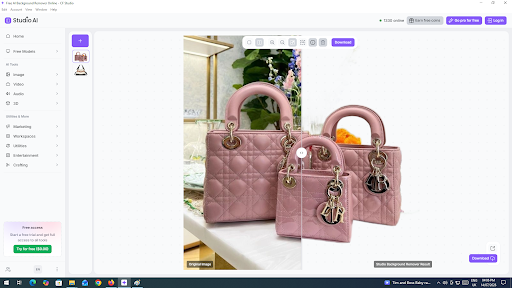
To get a real feel for it, I ran a batch of product-style photos through the app rather than a single test image.
Here’s the sequence I followed:
- Launched Creative Fabrica Studio Desktop and opened the local background remover.
- Dropped in a photo shot against a plain, uneven backdrop.
- Let the local model handle the processing no upload spinner, no server queue to wait behind.
- Exported a clean transparent PNG ready for a listing or a design file.
I also fed a smaller, lower-resolution graphic through the upscaler to check how it handled preparing something for print-size output, a common headache for anyone prepping designs for larger formats. The output came back noticeably crisper, and again, without the file ever leaving my computer.
Who Actually Benefits From This App?
Based on hands-on use, this is worth installing if you’re:
- Running an online shop and need consistent, clean product photography
- Producing print-on-demand designs that need to hit print-ready resolution
- A content creator who regularly needs transparent PNGs for thumbnails or overlays
- A freelance designer who’d rather keep client files off a cloud server
- A small business owner handling your own image editing without a design team
The Honest Pros and Cons
What works well:
- Actually free no card required, no forced upgrade for the core tools
- Available for both Windows and Mac
- Local processing for background removal and upscaling means quicker, more private edits
- Sits inside the existing Creative Fabrica Studio ecosystem rather than a separate app
- No per-image credit system for the local tools once set up
Where it falls short:
- Speed depends heavily on your machine — older hardware will feel it
- You’ll need to download the models before your first real use, which takes some setup time
- Certain features may still lean on an internet connection or your account
- Being a newer release, a few rough edges are still to be expected
None of that is a dealbreaker, especially set against paying per credit on a cloud-only competitor.
Frequently Asked Questions
Is Creative Fabrica Studio Desktop actually free to use?
Yes. The app, along with background removal, upscaling, image generation, and text-to-speech, doesn’t require a credit card or paid tier for the core tools.
Does the background remover process images locally?
Yes, once you’ve downloaded the local model, background removal runs on your own computer rather than through a cloud upload.
Is there a Windows version?
Yes, with a dedicated installer. A one-time security prompt during setup is normal and expected.
Does it run on Mac?
Yes, a Mac build is available alongside the Windows release.
Can I use it to prep product photos for an online store?
Yes it’s built for exactly this kind of batch background cleanup and product-photo prep.
Is it useful for print-on-demand work?
Yes, the local upscaler is particularly handy for bringing lower-resolution art up to print-ready quality.
Can it export transparent PNGs?
Yes, the background removal tool outputs transparent PNGs suitable for design and cutting projects.
Is this a real substitute for cloud background removers?
For the local tools, yes it removes the need to upload images to an outside service just for basic background removal and upscaling.
Do I need to stay connected to the internet?
You’ll need a connection to install the app and download the models initially. After that, the local tools can run without a constant connection, though some account features may still need one.
Where do my images actually get processed?
For the local tools, everything happens on your own computer rather than being sent to an external server.
Final Verdict
If credit limits and upload queues have been slowing down your editing workflow, Creative Fabrica Studio Desktop is worth the ten minutes it takes to install, especially since there’s no cost to try it. It isn’t going to replace every cloud-based tool overnight, but for background removal and upscaling arguably the two most repetitive tasks in any image-heavy workflow having a free, local, unlimited option is a genuinely practical addition.You can grab the free desktop AI background remover and upscaler and see how it slots into your own editing routine.