
Smartphones are now central to how children learn, socialize, and entertain themselves. But as of 2026, the risks parents worry about have evolved far beyond simple screen addiction. Today’s concerns include algorithm-driven content exposure, AI-powered scams, social media pressure, and location-based safety.
According to recent child digital safety studies (2024–2025), children now spend 30–40% more time on mobile apps than they did just three years ago, with short-form video and messaging apps driving most of that increase. This makes active digital supervision more important than ever.
That’s where free parental control apps for Android come in. These tools don’t just block content they help parents understand behavior patterns, set healthy boundaries, and intervene early when something feels off.
This updated 2026 guide breaks down the best free parental control apps for Android, explaining how they work, who they’re best for, and where free plans realistically fall short.
Why Parental Control Apps Matter More in 2026
Modern parental control apps are no longer just “filters.” The best ones now use:
-
Behavior-based monitoring (patterns, not just keywords)
-
AI-assisted content detection
-
Usage trend analysis instead of raw screen-time numbers
From an expert perspective, the biggest mistake parents make is relying on manual supervision alone. Kids today navigate apps designed to maximize engagement parental tools help level that playing field.
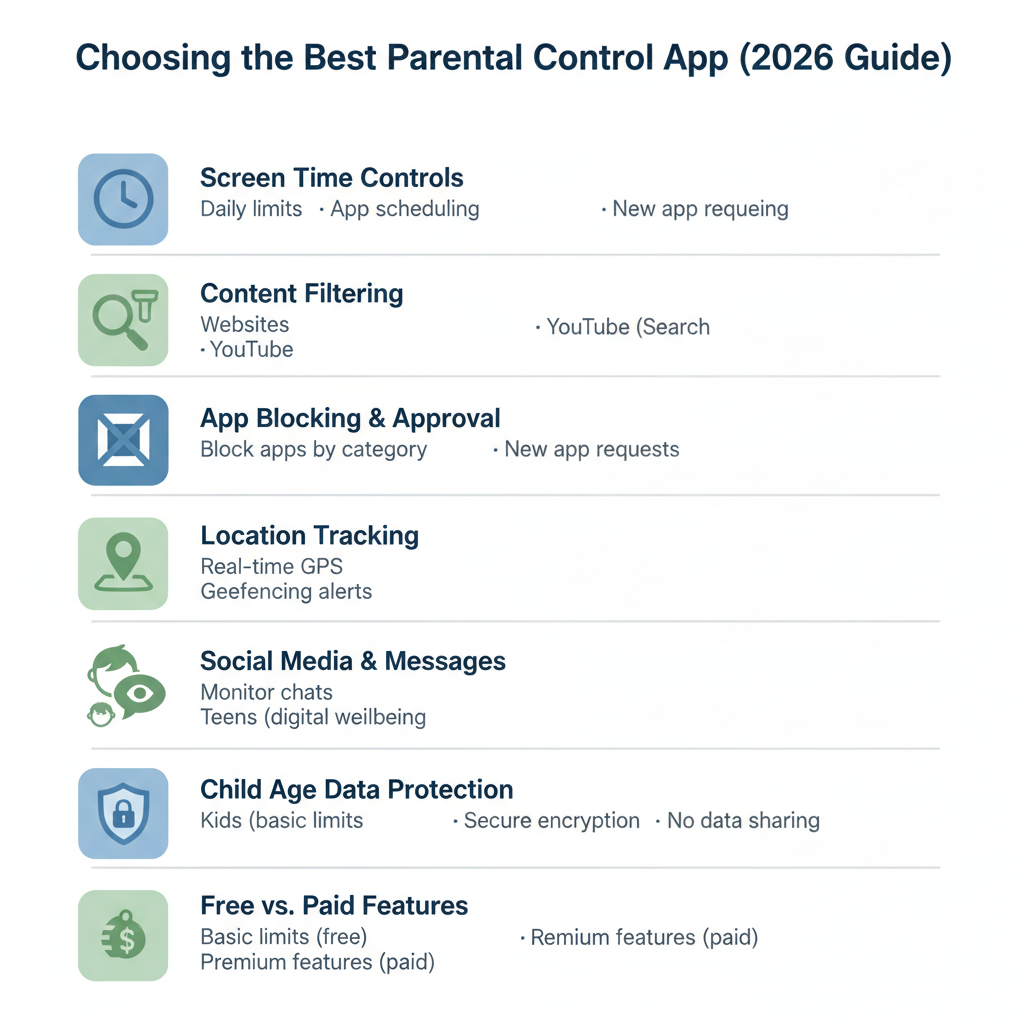
Key Benefits of Using Parental Control Apps
-
Monitor screen time trends, not just daily limits
-
Block age-inappropriate content
-
Track real-time or last-known location
-
Set context-aware digital rules (school hours vs free time)
-
Receive alerts for suspicious or risky activity
Best Free Parental Control Apps for Android (2026)
Important note: “Free” usually means basic features only. Below, we clearly explain what you actually get for free and where paid plans begin.
1. Kids Place – Parental Control
Best for younger kids & shared devices
Kids Place works by creating a restricted launcher, meaning your child can only access apps you approve. This approach is especially effective for children under 10 because it prevents accidental exposure rather than reacting after the fact.
Free version highlights:
-
App-level blocking
-
Screen-time limits
-
Purchase blocking
-
Custom child profiles
Expert insight: Launcher-based controls are harder for kids to bypass than traditional app blockers, making Kids Place surprisingly effective for a free tool.
2. Qustodio Parental Control
Best for usage insights & time management
Qustodio focuses on behavior tracking, showing parents how time is spent across apps, games, and browsing. Its dashboard-style reports are among the most detailed in the category.
Free version includes:
-
Daily screen-time limits
-
App monitoring
-
Activity reports (limited)
Free vs Paid: The free plan covers one device only, which can be limiting for families with multiple children.
3. Norton Family Parental Control
Best for web & search monitoring
Norton Family excels at web activity analysis, especially search behavior. It doesn’t just block unsafe sites, it shows what your child is actively looking for, which is valuable for early intervention.
Free features:
-
Web filtering
-
Search monitoring
-
Location tracking
2026 perspective: Norton’s strength lies in pattern detection, not micromanagement.
4. Kaspersky Safe Kids
Best lightweight, no-friction option
Kaspersky Safe Kids sticks to the fundamentals: time limits, content filtering, and app control without overwhelming parents with data.
Free plan offers:
-
Website blocking
-
App usage control
-
Screen-time scheduling
Why it stands out: Simple UI + fast setup makes it ideal for parents who want control without constant tweaking.
5. FamilyTime
Best for communication monitoring
FamilyTime includes call and SMS monitoring, which is becoming less common among newer apps focused only on screen time.
Free features include:
-
App blocking
-
Screen-time rules
-
Safe search enforcement
Limitations: Advanced tracking and geofencing are locked behind paid plans.
6. ESET Parental Control
Best for child-friendly design
ESET’s standout feature is how it communicates rules to kids, explaining why an app is blocked instead of silently restricting access.
Free version highlights:
-
App blocking
-
Time-based restrictions
-
Location tracking
Expert take: Transparency improves cooperation kids are less likely to rebel against clearly explained limits.
7. SecureTeen Parental Control
Best for social media awareness
SecureTeen monitors activity across popular platforms like Instagram and messaging apps, focusing on behavior signals rather than content alone.
Free features:
-
App restriction
-
Web history tracking
-
Screen-time limits
Note: Social monitoring depth is limited on the free plan.
8. Google Family Link
Best free parental control app overall (2026)
Google Family Link is deeply integrated into Android, making it one of the most reliable and stable free options.
Free features include:
-
App approval & blocking
-
Screen-time limits
-
Location tracking
-
Device-level controls
Why it wins: No ads, no upsells, and constant updates aligned with Android security changes.
9. Safe Lagoon
Best AI-powered threat detection
Safe Lagoon uses machine learning models to detect cyberbullying, grooming behavior, and emotional distress signals in messages.
Free plan includes:
-
Basic AI monitoring
-
App usage tracking
-
Web filtering
2026 trend insight: AI-based monitoring is becoming essential as threats shift from explicit content to subtle manipulation.
10. MMGuardian Parental Control
Best for deep message & call control
MMGuardian offers granular control over SMS, calls, and app access features many newer apps have dropped.
Free version highlights:
-
App blocking
-
Message monitoring (limited)
-
Screen-time management
Best for: Parents who want maximum visibility, even on older Android devices.
Free vs Paid Parental Control Apps (What Most Parents Miss)
Free apps are best for:
-
Young children
-
Basic supervision
-
First-time users
Paid plans become necessary when:
-
You need multi-device coverage
-
You want detailed social media insights
-
Your child is a teenager with advanced app usage
Frequently Asked Questions (People Also Ask)
Are free parental control apps safe to use?
Yes, but choose apps from established security companies or Google itself to avoid data misuse.
Can kids bypass parental control apps?
Some can especially basic app blockers. Launcher-based tools and system-level controls (like Family Link) are harder to bypass.
What’s the best free parental control app in 2026?
Google Family Link remains the best all-around free option for Android.
Do parental control apps invade privacy?
Good apps focus on patterns and safety signals, not spying. Transparency with children is key.
Final Thoughts (2026 Perspective)
Parental control in 2026 isn’t about surveillance, it’s about guidance. The best free parental control apps help parents understand digital behavior, set reasonable boundaries, and step in only when necessary.
If you’re starting out, Google Family Link or Kids Place are excellent free choices. As your child grows, consider transitioning to tools with behavioral insights and AI-powered monitoring.